
What’s a harness for AI agents?
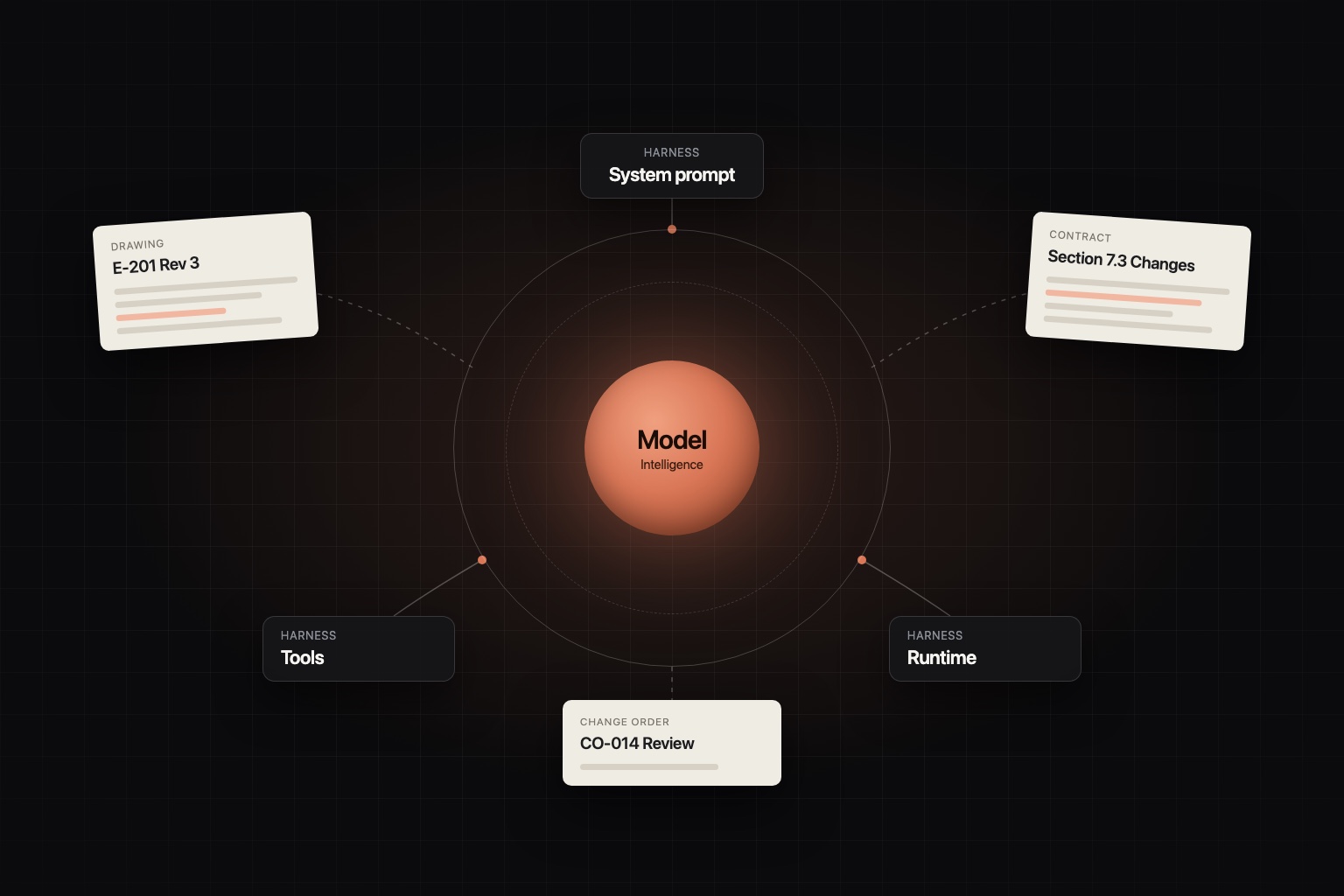
You have probably heard the term harness used multiple times when people talk about AI agents. But what exactly is it, and why does it matter?
A harness is the system built around an AI model that allows it to perform tasks, use tools, access information, and execute workflows. It provides the structure needed for a language model to operate beyond a simple conversation.
You can think of an AI agent as a combination of a model and a harness. The model provides the intelligence, while the harness determines how that intelligence is applied to a task.
System prompt. Tells the agent it reviews change orders, what to compare, and when to ask the project manager.
Although harnesses can vary significantly in complexity, we can break them down into three main components to understand how they work.
1. The system prompt: Giving the agent instructions
The first component is the system prompt. This is where you define the agent’s role, responsibilities, instructions, and expected behavior.
For example, if you’re building an agent to help a construction project manager review change orders, its system prompt might instruct it to examine contract requirements, compare proposed work against the original scope, identify missing documentation, and prepare its findings for review.
The instructions can also define how the agent should approach unfamiliar situations, when it should ask for clarification, and which decisions require human involvement.
You review change orders for the project manager on the Riverside Medical Center project.
For each change order:
1. Read the contract requirements that apply to the change.
2. Compare the proposed work against the original scope.
3. List missing documentation, such as backup pricing or a revised drawing.
4. Prepare your findings for the project manager's review.
If the scope or a contract clause is unclear, say what is unclear and ask. Do not guess at quantities or prices.
You prepare findings. The project manager decides whether a change order is approved, rejected, or sent to the owner.
A well-written system prompt provides enough guidance for the agent to make decisions without requiring instructions for every possible scenario.
However, there is a limit to what system prompts can accomplish. They influence the model’s behavior, but they cannot guarantee that it will always follow instructions correctly. Rules involving security, permissions, and approvals need to be enforced by the surrounding software.
| Rule | In the system prompt | Enforced by the software |
|---|---|---|
| Compare proposed work against the original scope | Yes, as part of the review steps | Not needed |
| Ask when a contract clause is unclear | Yes, as guidance for unfamiliar situations | Not needed |
| Read only projects the user can access | Can be mentioned | Yes, every document request is checked |
| Get approval before submitting a change order | Can be mentioned | Yes, the submission waits for a person |
| Never change contract values | Can be mentioned | Yes, the agent has no tool that edits them |
2. Tools: Giving the agent the ability to act
The second component is the set of tools available to the agent.
Without tools, a language model is generally limited to working with the information provided in its context and generating responses. Tools allow it to retrieve additional information, interact with applications, execute code, and make changes in external systems.
A tool can be as simple as a calculator or web search function, or as complex as an integration with an enterprise project management system.
For our construction agent, we might provide tools that allow it to search project documents, retrieve contract information, compare drawings, access change order records, and create draft reports.
When the agent determines that it needs additional information, it can request a tool call. The application executes that request and returns the result to the model, allowing it to decide what to do next.
Tools can be implemented directly through APIs or exposed through standards such as the Model Context Protocol (MCP), which makes it easier to connect agents to different applications and services.
The design of these tools matters. An agent with access to dozens of poorly defined tools may struggle to select the correct one or interpret its results. Clear descriptions, well-structured inputs, and predictable outputs make tools easier for models to use reliably.
name: search
description: Searches.
input:
  q: string
output: text
name: search_project_documents
description: Finds drawings, specs,
  RFIs, and letters on one project.
  Returns the latest revision unless
  one is given.
input:
  project_id: string
  query: string
  document_types: drawing | spec |
    rfi | letter
  revision?: string
output:
  results: title, number, revision,
    page, excerpt, link
Tool access also needs appropriate boundaries. An agent that can prepare a change order draft does not necessarily need permission to approve it or send it to an owner.
| Tool | What it covers | Agent access |
|---|---|---|
| Search project documents | Drawings, specs, and correspondence | Read |
| Retrieve contract information | Scope, unit prices, and change clauses | Read |
| Compare drawings | Differences between two sheet revisions | Read |
| Access change order records | Existing change orders and their status | Read |
| Create draft reports | Findings for the project manager | Draft only |
| Approve a change order | The decision on the change | None |
| Send to the owner | Issuing the package outside the team | None |
3. The runtime: Managing how the agent works
The third component is the runtime, which includes the execution loop, context management, and controls that keep the agent operating.
This is where much of the engineering behind reliable AI agents takes place.
Consider what happens when an agent receives a request to prepare a change order review. It may need to retrieve the contract, locate relevant drawings, examine existing change orders, compare pricing information, and organize its findings.
These steps rarely happen in a single model call.
The runtime manages the sequence of interactions between the model and its tools. It sends information to the model, processes tool requests, returns their results, and continues the process until the task is completed or requires intervention.
It also determines how the agent maintains context throughout its work.
Language models have limited context windows, so continuously adding documents, conversation history, and tool results can eventually become expensive or overwhelm the available space. A harness may selectively retrieve relevant information, summarize earlier steps, or store intermediate results for later use.
Share of the model’s context window used at each step. Illustrative.
Show the data
| Step | Kept in full | Summarized |
|---|---|---|
| 1. Request | 4% | 4% |
| 2. Contract | 13% | 10% |
| 3. Scope | 22% | 15% |
| 4. Drawing E-201 | 38% | 22% |
| 5. Drawing E-202 | 54% | 27% |
| 6. Change orders | 63% | 26% |
| 7. Pricing | 71% | 30% |
| 8. Specs | 80% | 33% |
| 9. Prior RFIs | 91% | 31% |
| 10. Comparison | 100% | 35% |
| 11. Findings | Full | 37% |
| 12. Draft | Full | 36% |
For longer-running tasks, the runtime may also need to save progress, recover from errors, retry failed operations, and resume work after interruptions.
| What happens | What the runtime does |
|---|---|
| The document search times out | Retries the request after a short wait |
| A tool returns an error | Passes the error to the model so it can try another approach |
| The server restarts mid-review | Resumes from the last saved step instead of starting over |
| The review needs a decision | Pauses and waits for the project manager |
Another important responsibility is enforcing controls. For example, an agent might be allowed to generate a change order package but must receive approval before submitting it. That requirement should be implemented in the execution logic rather than relying entirely on the model to remember the instruction.
Logging and tracing are also useful parts of a production harness. They allow developers to inspect which tools an agent used, what information it received, where it encountered errors, and how a task progressed.
Select a step to see its input and result.
- Input
- E-201, revisions 2 and 3
- Result
- First attempt timed out. Retry returned 140 ft of new conduit.
Why the harness matters
Two agents using the exact same language model can perform very differently depending on how their harnesses are designed.
One might have access to the right documents, clearly defined tools, and a runtime capable of maintaining progress across a complicated task. Another might struggle with the same request because it receives incomplete context, selects the wrong tools, or loses track of earlier steps.
| What differs | Agent A | Agent B |
|---|---|---|
| Context | The contract, current drawings, and prior change orders | Whatever was pasted into the chat |
| Tools | A few tools with clear descriptions and typed inputs | Dozens of overlapping tools |
| Progress | Saves each step and resumes after an error | Starts over when something fails |
| Controls | Submission waits for approval | Relies on the prompt to remember |
| Likely result | Findings tied to the current drawing revision | Findings based on an outdated sheet |
This is one reason improvements in agent performance do not come exclusively from better AI models.
Developers can improve an existing agent by refining its instructions, changing how information is retrieved, improving tool definitions, adding verification steps, or adjusting the way the runtime handles failures.
These improvements can be measured through evaluations that test whether the agent completes tasks correctly, uses the expected information, respects permissions, and produces consistent results.
| Check | Example test case |
|---|---|
| Completes the task correctly | Flags that the added conduit run has no backup pricing |
| Uses the expected information | Cites drawing E-201 revision 3, not the superseded revision 2 |
| Respects permissions | Declines to read a project the user cannot access |
| Produces consistent results | Reaches the same findings across repeated runs |
The appropriate harness also depends on the work being performed. A research agent may need web browsing, source verification, and document analysis. A coding agent may need a filesystem, terminal access, testing tools, and an isolated execution environment. An agent operating in construction may require integrations with project management platforms, drawing repositories, schedules, and financial records.
| Agent | Information it needs | Tools | Environment and controls |
|---|---|---|---|
| Research | Web pages, papers, reports | Web browsing, document analysis | Source verification before citing |
| Coding | The repository and its history | Filesystem, terminal, testing tools | An isolated execution environment |
| Construction | Drawings, specs, contracts, schedules, costs | Project management, drawing, schedule, and financial integrations | Approval before anything leaves the team |
As AI models continue to improve, harness engineering will remain an important part of building useful agents. The challenge is designing systems that can give models the right information, capabilities, and controls to complete work reliably, especially when tasks involve multiple applications, changing information, and real-world consequences.